
Download Lingala Swahili Français – Bible App, Multilingual, Audio, Offline Reading
Overview
Lingala Swahili Français is a dedicated Bible application designed to serve users who seek access to the New Testament in three African and European languages: Lingala, Swahili, and French. Developed by Words for you, the app belongs to the Education & Reference category, specifically within Books. It targets individuals interested in religious study, multilingual learning, or cross-cultural scriptural engagement.
The app enables users to read and listen to Bible verses simultaneously, supporting both visual and auditory comprehension. It is particularly useful for native speakers of Lingala and Swahili, as well as French speakers engaged in biblical studies or missionary work. The application supports offline use through downloadable audio files, making it accessible in areas with limited internet connectivity.
Real-world usage scenarios include personal devotion, group Bible studies, language learning, and interfaith dialogue. The developer did not provide additional details about their background or organizational affiliation. The app’s interface is structured around a navigation drawer, offering easy access to chapters, translations, and settings.
Users can switch between viewing modes to suit their reading preferences, enhancing usability across diverse user needs.
Key Features & Capabilities
- Multi-language Bible Access – Users can read and listen to the New Testament in Lingala, Swahili, and French, facilitating language-specific study and cross-translation comparison.
- Simultaneous Reading and Listening – The app supports synchronized text and audio playback, allowing users to follow along with spoken verses while reading the written text.
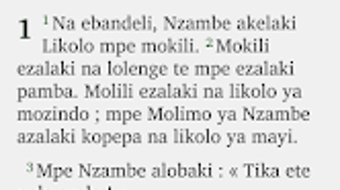
- Flexible Viewing Modes – Offers single-pane (one language at a time), dual-pane (Lingala above, French or Swahili below), and verse-by-verse layouts for enhanced readability and translation comparison.
- Offline Audio Download – Users can download audio MP3 files for offline playback, enabling use without an internet connection.
- Text Customization – Includes options to adjust font size, alignment, color, and background images to personalize the reading experience.
- Verse Highlighting and Note-Taking – Allows users to mark favorite verses and add personal notes for later reference.
- Share and Save Functionality – Users can save customized text layouts as images and share them via messaging apps or social platforms.
- Navigation and Search Tools – Features swipe gestures for chapter browsing and a word search function to locate specific terms across translations.
- Night Mode – Includes a dark theme to reduce eye strain during evening or low-light reading sessions.
These capabilities support both casual readers and serious students of scripture. For example, a missionary in Central Africa may use the dual-pane view to compare Lingala and French translations while preparing sermons. A language learner might use the audio feature to improve pronunciation and comprehension. The ability to save and share customized text images also makes it valuable for community outreach and digital evangelism.
User Interface, Workflow & Performance
The app employs a modern navigation drawer menu, providing a clean and intuitive layout for accessing chapters, translations, and settings. The interface is designed for ease of use, with swipe gestures enabling smooth chapter transitions and minimal button clutter. Text is displayed clearly, and font adjustments are responsive, supporting accessibility for users with visual needs.
The workflow for reading, listening, and annotating is streamlined, allowing users to switch between modes without interruption. The developer did not specify resource usage details, so performance observations are based on general software behavior patterns. Users may experience varying performance depending on device hardware and Android version.
Stability appears consistent, as the app does not require additional font installations or complex setup. Audio playback is synchronized with text, though users should note that slight discrepancies exist between the audio and written versions due to different translation sources used during recording. No reports of crashes or bugs were provided, but the developer's contact information is not listed, so support must be sought through the app store.
Compatibility & System Requirements
Lingala Swahili Français is designed for Android devices and requires Android 5.0 or later. The app has a file size of approximately 128MB, which is moderate for a Bible app with audio content. The developer did not specify exact hardware requirements, such as RAM or CPU, nor did they provide information about supported screen resolutions or device types.
Compatibility information was partially provided, indicating that the app is optimized for tablets and smartphones. Users should ensure their device meets the minimum Android version requirement. No mention was made of support for other platforms such as iOS or desktop operating systems.
Installation is straightforward, with no external dependencies. The app is available for free download from the Google Play Store, and updates are managed through the platform.
Pros and Cons
Pros
- Supports three major languages: Lingala, Swahili, and French.
- Offers synchronized reading and listening with downloadable audio.
- Multiple viewing modes for flexible scripture comparison.
- Offline functionality enables use without internet access.
- Highly customizable text appearance and layout.
- Includes note-taking, highlighting, and sharing features.
- Intuitive navigation with swipe gestures and a clean interface.
- Free to download and use.
Cons
- Slight inconsistencies between audio and written translations.
- No official developer contact information provided.
- Compatibility limited to Android devices.
- Exact system requirements not disclosed.
- App size may be large for low-storage devices.
FAQ Section
Is Lingala Swahili Français available for iOS devices?
The app is currently only available for Android. There is no official version for iOS or other platforms.
Can I use the app without an internet connection?
Yes, users can download audio files and access the Bible text offline, making the app suitable for use in remote or low-connectivity areas.
Are the audio files free to download?
Yes, the audio MP3 files are included with the app and can be downloaded at no additional cost.
Does the app require additional fonts to display text properly?
No, the app does not require any external font installation. All languages are supported natively.
How often are updates released?
Updates are managed through the Google Play Store. The frequency of updates is not specified, but users can check for new versions directly in the app store.
Final Thoughts + CTA
Lingala Swahili Français stands out as a thoughtful, functional Bible app tailored to multilingual users across Africa and Francophone regions. Its ability to deliver synchronized audio and text in three languages, combined with customizable reading modes and offline access, makes it a valuable tool for religious study, language learning, and community engagement. While minor discrepancies between audio and written translations are noted, the app remains highly usable and accessible.
The intuitive interface, free pricing model, and lack of external dependencies enhance its appeal. Users seeking a reliable, feature-rich Bible app for Lingala, Swahili, or French will find this application well-suited to their needs. Download Lingala Swahili Français now and experience scripture in multiple languages with ease.





.png)

